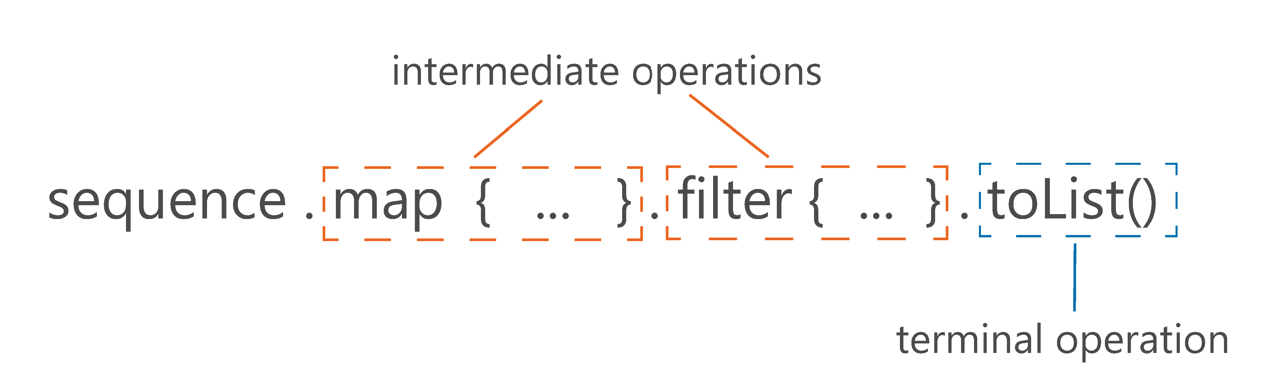
Sequences are lazy, therefore intermediate functions for Sequence processing don’t do any calculations. Instead, they return a new Sequence that decorates the previous one with the new operation. All these computations are evaluated during a terminal operation like toList() or count() - effective-kotlin
The sequence builder should NOT use suspending operations other than yielding operations.
Notes
Kotlin Sequences: Evaluated on Demand
Keep the natural order of operations.
Kotlin Sequences: Evaluated on Demand Keep the Natural Order of Operations
Often we do not need to process a whole collection at every step to produce the result. Let’s say that we have a collection with millions of elements and, after processing, we only need to take the first 10. Why process all the other elements? Iterable processing doesn’t have the concept of intermediate operations, so a processed collection is returned from every operation. Sequences do not need that, therefore they can do the minimal number of operations required to get the result. - effective-kotlin
Code example: where with Sequence we process less functions
Code
package com.glassthought.sandboximport gt.sandbox.util.output.Outimport gt.sandbox.util.output.impl.OutSettingsval out = Out.standard(OutSettings(printCoroutineName = false))fun <T> T.printlnGreen() { out.printGreen(this.toString()) println()}fun main(args: Array<String>) { println("As list - finding a match:") (1..10) .filter { out.printBlue("F$it, "); it % 2 == 1 } .map { print("M$it, "); it * 2 } .find { it > 5 } .printlnGreen() println() println() println("As sequence - finding a match:") (1..10).asSequence() .filter { out.printBlue("F$it, "); it % 2 == 1 } .map { print("M$it, "); it * 2 } .find { it > 5 } .printlnGreen()}
Command to reproduce:
gt.sandbox.checkout.commit 318c2014d368df941520 \&& cd "${GT_SANDBOX_REPO}" \&& cmd.run.announce "./gradlew run --quiet"
Recorded output of command:
6 is the match is the first match in this case:
As list - finding a match:F1, F2, F3, F4, F5, F6, F7, F8, F9, F10, M1, M3, M5, M7, M9, 6As sequence - finding a match:F1, M1, F2, F3, M3, 6
For this reason, when we have some intermediate processing steps and our terminal operation does not necessarily need to iterate over all elements, using a sequence will most likely be better for your processing performance and it looks nearly the same. Examples of operations that do not necessarily need to process all the elements are [first, find, take, any, all, none, or indexOf].
Thanks to the fact that sequences do processing on demand, we can have infinite sequences. A typical way to create an infinite sequence is using sequence generators like generateSequence or sequence.
gt.sandbox.checkout.commit 262033ba438658622981 \&& cd "${GT_SANDBOX_REPO}" \&& cmd.run.announce "./gradlew run --quiet"
Recorded output of command:
1, 2, 3, 4, 5, 6, 7, 8, 9, 10,
Fibonacci example: using 'sequence'
Fibonacci
Code
package com.glassthought.sandboximport gt.sandbox.util.output.printimport gt.sandbox.util.output.printGreenimport gt.sandbox.util.output.printlnimport kotlinx.coroutines.runBlockingimport java.math.BigDecimal// Declare a sequence of Fibonacci numbers, using BigDecimal// to handle large values.val fibonacci: Sequence<BigDecimal> = sequence { // Initialize the first two Fibonacci numbers. var current = 1.toBigDecimal() // Current number in the sequence var prev = 1.toBigDecimal() // Previous number in the sequence // Emit the first Fibonacci number (1). yield(prev) // Use an infinite loop to generate subsequent numbers. while (true) { // Emit the current Fibonacci number. yield(current) // Compute the next Fibonacci number by adding the previous two numbers. val temp = prev // Temporarily store the previous number prev = current // Update the previous number to the current one current += temp // Update the current number to the sum of current and previous }}fun main() = runBlocking { fibonacci.take(10).toList().println() System.out.flush()}
Command to reproduce:
gt.sandbox.checkout.commit d48a6563eadebbd18ccf \&& cd "${GT_SANDBOX_REPO}" \&& cmd.run.announce "./gradlew run --quiet"
 {max-width: 500px, display: block, margin: 0 auto, border: 5px solid black}