To use the flexbox model, you must make a parent element a flex container (aka flexible container).
You do this by setting display: flex or display: inline-flex for the inline variation. It’s that simple, and from there you’re all set to use the Flexbox model.
/*Make parent element a flex container*/ul { display: flex; /*or inline-flex*/}
Basic Flexbox GT-Sandbox-Snapshot
Command to reproduce:
gt.sandbox.checkout.commit 68cf8efc8214fbb76aed \&& cd "${GT_SANDBOX_REPO}" \&& cmd.run.announce "chrome ./main/index.html"
Recorded output of command:
_chrome ./main/index.htmlOpening in chrome: ./main/index.html
There are 6 different properties the flex container can take on.
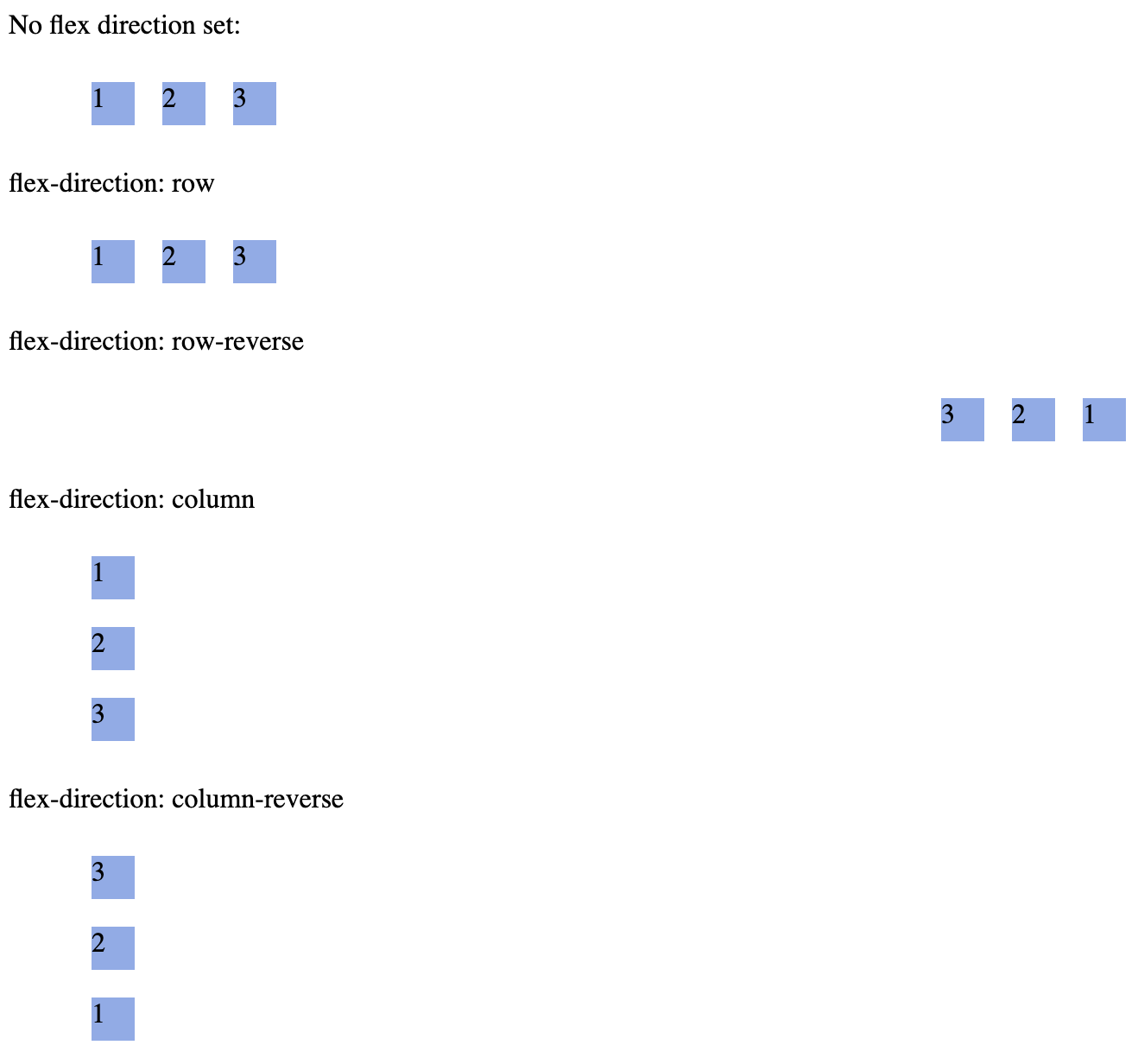
flex-direction
flex-direction (FlexBox Property)
graph LR

FD[flex-direction, Controls:] --> Order[Which order]
FD --> Direction[Which direction]
FD --> Side[From which side of the box]
Order --> Placement[the elements are placed]
Direction --> Placement
Side --> Placement
Flex Direction Controls:
which order
which direction
from which side of the box
the elements are placed.
/* There are 4 values for the property, example setting this propertywhere ul represents a flex container, */ul { flex-direction: row || column || row-reverse || column-reverse;}
GT-Sandbox-Snapshot
Command to reproduce:
gt.sandbox.checkout.commit 870edcc21fa6ffb73d26 \&& cd "${GT_SANDBOX_REPO}" \&& cmd.run.announce "chrome ./main/index.html"
Recorded output of command:
_chrome ./main/index.htmlOpening in chrome: ./main/index.html
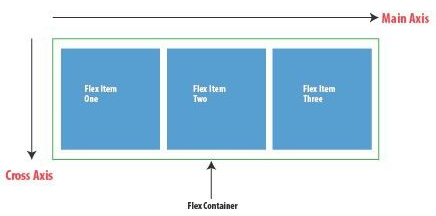
Controls main axis direction (vertical/horizontal)
The flex-direction controls whether main-axis is vertical or horizontal.
Below is example of axis when flex-direction is set to row
flex-flow (shorthand for flex-direction & flex-wrap)
Flex Flow
Shorthand for:
flex-direction
flex-direction (FlexBox Property)
graph LR

FD[flex-direction, Controls:] --> Order[Which order]
FD --> Direction[Which direction]
FD --> Side[From which side of the box]
Order --> Placement[the elements are placed]
Direction --> Placement
Side --> Placement
Flex Direction Controls:
which order
which direction
from which side of the box
the elements are placed.
/* There are 4 values for the property, example setting this propertywhere ul represents a flex container, */ul { flex-direction: row || column || row-reverse || column-reverse;}
GT-Sandbox-Snapshot
Command to reproduce:
gt.sandbox.checkout.commit 870edcc21fa6ffb73d26 \&& cd "${GT_SANDBOX_REPO}" \&& cmd.run.announce "chrome ./main/index.html"
Recorded output of command:
_chrome ./main/index.htmlOpening in chrome: ./main/index.html
Controls main axis direction (vertical/horizontal)
The flex-direction controls whether main-axis is vertical or horizontal.
Below is example of axis when flex-direction is set to row
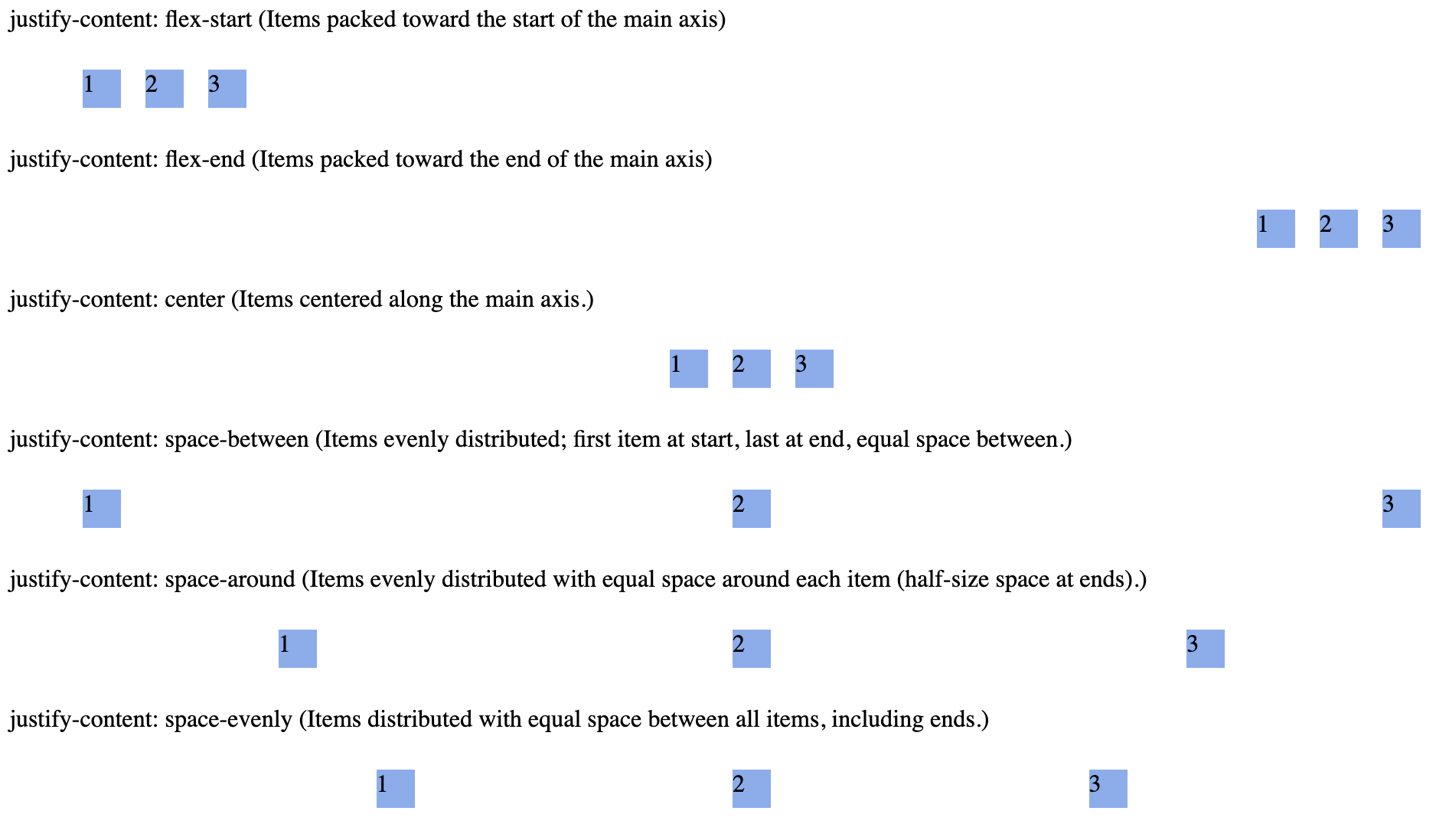
The justify-content property aligns flex items along the main axis (horizontal in default flex-direction: row). It distributes extra space when items do not fully occupy the container.
Image: Flex box Main Axis Horizontal (flex-direction: row)